
Finance
Associated Student Activities (ASA) is the financial office for the more than 1,000 recognized student organizations at University Park with a primary function of serving as a banker, accountant, paymaster, and advisor on fiscal matters.
-
- All recognized student organizations are required to participate in the Mandatory RSO Officer Training Course on Canvas.
- Treasurers will complete:
- Financial Management 1
- Financial Management 2
- RSO 101
- Hazing Prevention
-
Your organization must first be recognized by the Office of Student Leadership and Involvement, located in 103 HUB-Robeson Center before you can set up an ASA account for your organization.
As soon as your organization has an active status, the treasurer (who MUST be listed as the treasurer on orgcentral.psu.edu) will need to come into the ASA office to set up the account. You can also set up an account by filling out a New Organization Request Form.
Once ASA has received and processed the New Organization Request Form, you will be assigned an ASA organization/account number to be used for all club transactions. If you are a new treasurer but already have an ASA account, you will not need to fill out the New Organization Request Form. However, you will still need to update the treasurer information in Discover.
-
Unrestricted Funds/Fund Source “30”
Every organization has an Unrestricted account at Associated Student Activities (ASA). This is comprised of money that the organization generates through dues collection, donations, fundraising, equipment sales, etc. This is the organization’s money to spend as they see fit as long as they spend it in accordance with University guidelines.
UPAC Allocated Funds/Fund Source “10”
Organizations can request funding from UPAC (University Park Allocation Committee) to be used towards events, travel experiences, equipment, and other items. UPAC allocates a portion of the Student Initiated Fee (SIF) income towards events, travel experiences, equipment, and other items requested by student organizations to enhance the out-of-class experience.
When an organization is allocated funds, UPAC will provide ASA with a copy of the allocation letter which states the line item breakdown of the allocated funds. In order to be reimbursed for UPAC funds, the organization must submit the appropriate ASA form(s), such as a Check Request, Mileage Request, or Payment for Services Request Form. Requests, along with all supporting documentation, may be submitted in person or via asaoffice@psu.edu. Organization members using UPAC Funds for Travel must register the Club's Travel in OrgCentral. Additionally, when using UPAC Funds for travel experiences, members must travel first before being reimbursed.
When using UPAC allocated funds, it is very important to select the appropriate fund source (UPAC is Fund Source 10) and object codes (as listed on the UPAC letter) on each ASA form. Funds are to be used exactly as specified in the letter. If a request is submitted that lists items not included on the allocation letter, ASA will process that portion of the request from the organization’s Unrestricted 30 account. We can NOT pay and/or reimburse from the UPAC fund source until UPAC provides ASA with a copy of your allocation letter.
- It is the organization’s responsibility to initiate correspondence with UPAC for possible funding. Every organization that receives UPAC funding is subject to an audit by UPAC to ensure compliance with the allocation of Student Initiated Fee funds.
- All allocated UPAC funds that are remaining in an organization’s account at the end of the fiscal year (June 30) will be returned to the Student Fee Board.
Activity Fee Funds/Fund Source “40” (Standing Allocations)
These funds are allocated to affiliated organizations by the University Park Student Fee Board (UPSFB) and are to enhance the student experience at Penn State.
-
All RSO’s are required to do their “banking” with the ASA office External accounts are prohibited, which include, but are not limited to, personal bank accounts and mobile financial applications.
Managing Accounts and Funds
-
When an organization is allocated UPAC funds, UPAC will provide ASA with a copy of the allocation letter. Once ASA has the letter, you may turn in a check request or invoice for reimbursement. As with all reimbursement requests, original itemized receipts are required.
UPAC funds must be spent as allocated in the letter. Be sure to indicate on the check request or invoice that the funding source is UPAC (10) or the Unrestricted (30) account will be used for reimbursement.
-
A Transaction Report shows all income and expenses for an organization. Only the treasurer, president, or advisor of an organization may request the report. You may come into the ASA office to request a printout of the report or send an email request to asaoffice@psu.edu. The report will be emailed to you typically within 24 hours of your request.
-
Your organization may not request or withdraw funds from their account. Club members must turn in receipts to get reimbursed for club expenses or submit invoices to be paid directly to the vendor. Funds must be spent in accordance with University guidelines.
-
A receipt that lists the vendor’s name, date of purchase, and items purchased. Receipts must clearly show the items as paid and must be in US dollars. Restaurant receipts must be itemized, listing what was ordered (no alcohol will be reimbursed). Internet receipts must also show the name of the individual who paid for the items. Photocopies of receipts are not permitted.
- Bank and credit card statements are not considered valid receipts for expenses.
-
Any club member can make a deposit into the student organization’s account.
- Deposits typically take 24 hours before they show up in your organization’s account.
-
The treasurer must submit a Check Request form, along with a list of names for all club members which are being paid on behalf of the organization. Backup is also required showing how much the dues or registration casts are per person.
-
Have a Plan
To begin budgeting, you should have a plan to know exactly what you need to budget for. Meeting with your members will help create a list of events, activities, or trips to different locations. Including ideas for the whole school year will give you a head start against the competition.
- Activities Fair: food and leaflet costs
- General Meetings: food costs
- Movie Screening Nights: food, room reservation, and screening permit costs
- Guest Speaker: room reservation, speaker fees, travel costs, publicity costs, technical cost
- Travel Experiences: transportation costs, possible lodging, registration or admission fees.
- Concert/Music Performers: Venues, performance fees, sounds, and technical needs,
Estimate Cost
Writing out a plan for the events you wish to throw during the year could also help by determining the cost of the event. Including items like decorations, costumes, and/or games could help your organization understand how much the event might cost. This could also help you cut out pricier events.
Find the Money
- Fundraising
- Charging dues
- Selling items
- Auctions
- Contest
- Ask for Donations
- Working with Departments
Cutting Money Corners
Money is hard to come by. Tips and tricks to saving money can help your club throw amazing events without breaking the bank.
- Always look for sales!
- Dollar Stores, Dollar Stores, Dollar Stores
- Write a list before you throw anything into the cart
- Price check!
- Go in groups
- Collaboration with other organizations
Keep Track of Spending
The treasurer's role in the club is that of great importance! Having your treasurer keep records of club spending and even the cost of previous events could help you save big bucks!
- Keep track of spending (It's good to have a reference for future members)
- Have a history of previous spendings on events, items, etc.
- Transition notebook
- Communicate with previous board members
-
Recognized Student Organizations may apply for student recreational facilities and equipment funding for the upcoming academic year. Applications are available here and will be due on March 1.
- Notifications of awarded funds will occur via email in April.
- Only one request per organization per academic year is permitted.
Vendors and Purchasing
-
Obtaining a Purchase Order
A purchase order (PO) is the most convenient method of payment because it eliminates the need for a club member to pay out of pocket. With the use of a PO, ASA pays the vendor directly. The club will request an estimate from the vendor and then request a PO from ASA. The treasurer of the club may assign up to 3 club members the ability to sign for a PO. Only those with PO signing authority may request and sign the PO. The club member delivers the PO to the vendor. The vender must then submit an invoice to ASA, referencing the PO #, in order to get paid ASA will issue a check directly to the vendor.
- The organization MUST have the funds in their account in order to request a PO. A purchase order (PO) will not be issued if an organization has insufficient funds.
Closing a Purchase Order
PO’s are automatically closed when an invoice is received and paid as long as the invoice references the PO. If a PO is no longer needed, it can be voided as long as you return the original PO to ASA and ask for it to be voided.
- PO’s are valid for one year from the date they are generated. If not used within that year, ASA will automatically close the PO.
-
Alcohol and alcoholic beverages will not be reimbursed with club funds per University policy.
-
This list is provided to help student organizations utilize ASA’s purchase order capabilities. This list is not entirely definitive, and new vendors may be added, or removed, based on ASA’s working relationship with these vendors. Please ask a staff member if you have any questions, or if the vendor you seek to do business with is not listed.
Advertising, Copies, Office Supplies, Printing
Business Name Phone Number Daily Collegian (814) 865-2531 Multimedia Print Center (814) 865-7544 Penn State Bookstore (814) 863-0205 Student Organization Printing Support (814) 863-3398 Catering, Food, Grocery Stores
Business Name Phone Number Campus Catering (814) 865-0975 Domino’s Pizza: North Atherton (814) 237-1414 Fresh Harvest Kafe (814) 272-6400 Hoag’s Catering (814) 238-0824 Irving’s (814) 231-0604 Jersey Mike's (814) 954-759 Jimmy John's (814) 237-9300 McLanahan’s (814) 238-2252 Papa John’s: North Atherton (814) 238-7272 Papa John's: South Atherton (814) 234-7272 Rotelli (814) 238-8463 Subway: Burrowes Street (814) 231-0232 Subway: E. College Avenue (814) 231-0233 Subway: Northland Center (814) 238-0234 Subway: Pugh Street (814) 231-0231 Clothing, Trophies, T-shirts
Business Name Phone Number Collegiate Pride (814) 237-4377 Custom Stuff (814) 234-7833 Lions Pride (814) 234-2153 Nittany Embroidery (814) 359-0905 PAMP (814) 359-2447 Rosewood Silkscreening (814) 237-3205 Sign Stop (814) 238-3338 Signature Engraving (814) 234-6010 Spotted Lizard Screen Printing (814) 355-1963 T’s Custom Printing (814) 237-2726 Teddy Bear Sportswear (TBS) (866) 840-7945 Equipment Rental
Business Name Phone Number Best Event Rental (814) 238-3037 Best Line Equipment (814) 206-7190 Media and Technology Services (814) 865-5400 Music Mart (814) 238-3711 Travel
Business Name Phone Number Fleet Operations (814) 865-7570 Fullington (814) 765-1186 Hotels, Motels, Conference Centers
Business Name Phone Number Atherton Hotel (814) 231-2100 Comfort Inn & Suites (814) 235-1900 Days Inn Penn State (814) 238-8454 Hilton Garden Inn (814) 272-1221 Holiday Inn Express (814) 867-1800 Hotel State College (814) 237-4350 Motel 6 (814) 234-4124 Nittany Lion Inn (814) 865-8500 Penn Stater Conf. Center & Hotel (814) 863-5000 Ramada Inn and Conf. Center (814) 238-3001 Sleep Inn (814) 235-1020 Toftrees Resort and Conf. Center (814) 234-8000 Miscellaneous
Business Name Phone Number Center for Performing Arts (814) 863-0388 Ice Rink (814) 863-2039 Krislund Camp & Conf. Center (814) 422-8878 Nittany Mountain Trail Rides (814) 880-5100 Police Services/Security (814) 863-2479 State Theatre (814) 272-0607 Stone Valley Recreation Area (814) 863-1164 Tussey Mountain (814) 466-6266 What A Blast Laser Tag (814) 234-8740 Woodrings Floral (814) 238-0566 Sign Factory (814) 234-7446 Vendors that DO NOT Accept Purchase Orders
- FedEx/Kinkos
- Giant Food
- Office Depot
- Sam's Club
- Staples
- Target
- Wal-Mart
- Wegmans
-
ASA uses the following guidelines when determining how to properly report cash and non-cash awards and gifts. ASA will report the details to the applicable offices outlined below:
Awards and Gifts Recipients Cash Awards* Gift Cards Awards of non-cash items (Plaques, Trophies, etc.) Student Recipients: All monetary awards to students will be posted to the recipient’s Bursar account through the Loans and Scholarships office (308 Shields Building). Cash Award/Gift Form Required Gift cards $100.00 or more are reported only if the student is a Penn State employee. The dollar amount is posted as an award through the Loans and Scholarships office (308 Shields Building) to the recipient’s bursar account. Check Request form is required. The value of a non-cash award item valued at $425.00 or more is reported to the payroll office (101 James Elliott Building, 865-7621) if the student is a Penn State employee OR the Loans and Scholarships office (308 Shields Building) if the student is not a Penn State employee. Check Request form is required. Penn State Employee Recipients (Staff or Faculty): All monetary awards to employees are processed and reported to the Payroll office (101 James Elliott Building, 865-7621). Recipients will receive these awards with their monthly pay, with taxes already taken out. Cash Award/Gift Form Required Gift cards of $100.00 or more are reported to the Payroll office (101 James Elliott Building, 865-7621). The appropriate taxes will be taken out of the recipients’ monthly pay. Check Request form is required. The value of a non-cash award item valued at $100.00 or more is reported to the Payroll office (101 James Elliott Building, 865-7621) for proper tax reporting. Check Request form is required. Non-Student/
Non-Employee Recipients:Cash awards between $1-$599 a check is processed by the ASA office. No reporting is necessary.
Cash award of $600 or more the check is processed by the ASA office. The dollar amount is reported to Accounting Operations. Cash Award/Gift Form Required.
Gift card recipients of $600.00 or more for non-Penn State employees or non-student recipients are reported to Accounting Operations. An NEI, W-9 and a Check Request form is required. Recipient of non-cash awards of items valued at $600.00 or more for non-Penn State employees or non-student recipients are reported to Accounting Operations. An NEI, W-9 and a Check Request form is required. - *Organizations should NOT pay cash directly to recipient and then seek reimbursement.
- The recipient’s name and Penn State ID# must be listed on the Check Request form for all gift cards and non-cash award items $425 or more if the recipient is a student or a Penn State employee.
-
Club members should NOT directly pay a speaker or performer by cash, personal check, or credit card. If they do, they will not be reimbursed. Anytime an individual or company is providing a service for an event on campus, a contract is needed. Contract payments for services will be made via a check provided by ASA or through Accounting Operations.
Services that require a contract include, but are not limited to, speakers, DJ’s, referees, instructors, and performers.
Treasurer Tools for Success
-
Income Object Codes
Income Description CODE Admission/Registration Fee Revenue 41006 Advertising Revenue 43112 Banquet Revenue 41003 Clothing/Uniform Revenue 41101 Donation Revenue *See special note below regarding donations 42000 Dues Revenue 41001 Equipment Rental Revenue 43011 Equipment Sales Revenue 43008 Fine Revenue 43108 Fundraiser Revenue 41200 Gifts from Office of University Development (OUD) 42011 Impact Fee Revenue 41259 Retreat Revenue 41004 Social Activities Revenue 41002 Ticket Sales Revenue 41250 Tournament Fee Revenue 41100 Travel Revenue 41005 *Donation Revenue - If you need a tax receipt, STOP!
Deposits must be made through the Office of University Development (OUD)Expense Object Codes
General Expense Description CODE Advertising 50210 Awards/Gifts 50225 Banner 60540 Banquet 60352 Books/Subscription 50266 CD and DVD 50290 Clothing/Uniform 50250 Collegian Ad 60520 Donation 50280 Dues/Membership 50220 EMT Service 60305 Equipment Maintenance 50145 Equipment Maintenance/Repairs 60206 Equipment Purchase 50140 Equipment Rental 50135 Festival/Fair Expense 60354 Food 50502 Fundraising 50275 Instructor 50252 Insurance Premiums 50160 Materials & Supplies 50503 Meal 60351 Meeting 50504 Office Supplies 50125 Parking 80550 Photography 50235 Postage 50120 Printing 50270 Professional Services 50150 Referees/Judges 50253 Registration/Tournament Fee 50251 Retreat 60353 Rush 50300 Security 60303 Social 50500 Special Function 60355 Telephone Rental 50110 Web Hosting 50264 Travel Expense Description CODE Travel - Conference 70060 Travel - Lodging 70020 Travel - Meal 70040 Travel - Registration 70030 Travel - Transportation 70010 UPAC Funded Expenses CODE General Operations ($50) 60641 Honoraria – Performing Artist 60104 Honoraria – Speaker 60100 Program - Copies/Flyers/Posters 60510 Program - Copyright/Licensing 60630 Program - Costume 60600 Program - Equipment Purchase 60202 Program - Equipment Rental 60201 Program - Facility Rental 60200 Program - Media Print/Broadcast 60530 Program - Movie Rental 60205 Program - Professional Services 60306 Program - Projectionist 60301 Program - Props 60620 Program - Publicity 60500 Program - Set Construction 60610 Program - Sound System Rental 60203 Speaker/Artist - Lodging 60151 Speaker/Artist - Meal 60152 Speaker/Artist - Parking 60153 Speaker/Artist - Transportation 60150 REFUNDS CODE Refunds
*See special note below regarding refunds50240 *Refunds - Only to be used when the payee first deposited money into the account and now needs refunded. For example, they paid for clothing they did not receive.
-
- Available Balance: The available balance is the amount of the balance that is available to spend. This figure is calculated by subtracting any encumbrances from the balance.
- Balance: This is equal to the start of fiscal year balance in the account, plus all revenue collected, minus all expenses paid via check or transfer.
- Encumbrances: An encumbrance means that a certain dollar amount of the balance is encumbered, meaning it cannot be spent. An encumbrance may be an open purchase order (not yet invoiced by a company), or an expense that may have been entered, but not posted to the account.
- Fiscal Year: The Penn State University fiscal year runs from July 1 to June 30. All transaction reports reflect this fiscal year.
- Honorarium: An honorarium is a dollar amount that’s paid to a performer/speaker/DJ.
- Impact Fee: This fee is collected from student organizations that charge $5.00 or more for admission to an on-campus entertainment event. This fee is verified and collected through a ticket accountability form from ASA.
- Legal Line (checks): The legal line on a check is the section where the dollar amount is written. Please make sure the legal line matches the dollar amount. If this is different than the dollar amount, the check will either be returned to you, or deposited in the amount listed on the written legal line.
- Morning Report: Every morning ASA prints a report that shows the current balances of all organizations that have money. This printout shows the current balance, any encumbrances, and the available balance of the organization (these terms are defined below).
- Per Diem: This is a dollar figure that’s given to an individual for food and miscellaneous items when traveling. This dollar figure may vary depending on where and when the travel occurs.
- Purchase Order: A purchase order is a means to utilize the organization’s funds to purchase goods or services to a vendor. Once you know how much the goods or services will cost, ASA will provide you with the purchase order, which states the organization name, vendor, and dollar amount. The vendor accepts the purchase order as “payment” and will send an invoice, referencing the purchase order number, to ASA, and we will send payment. It’s the best way to utilize your organization’s funds without having to pay out-of-pocket and then seeking reimbursement.
- Note: Check first to see if the vendor accepts purchase orders. ASA has a list of common vendors that accept purchase orders.
- Transaction Report: A transaction report shows all activity (income and expenses) within the current fiscal year. This should be regularly checked against your ledger.
- Note: Your balance shown on this report is not your available balance.
-
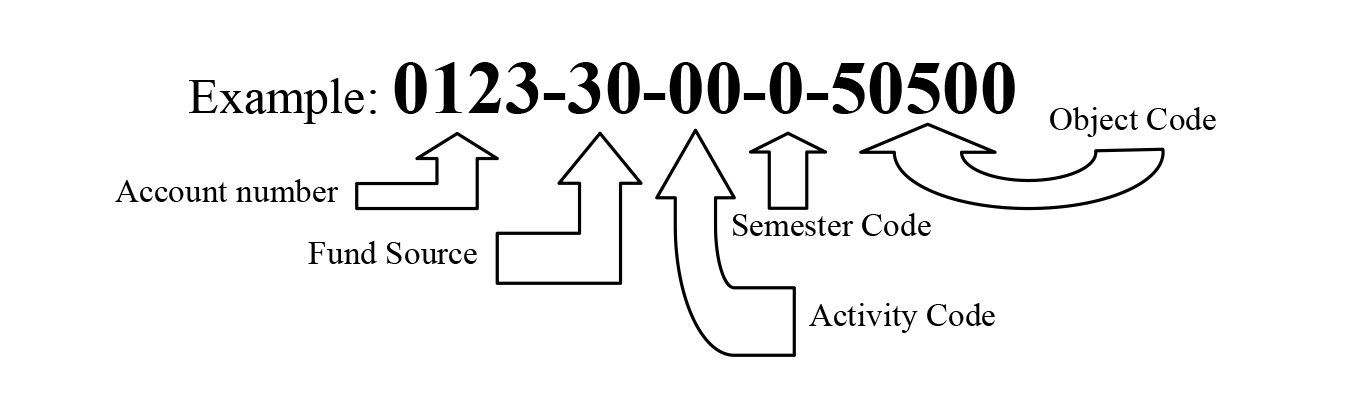
- Account String: The Account String is the combination of the following items: Account Number, Fund Source, Activity Code, Semester Code, and Object Code.
- Example: 0123-30-00-0-50500
- Account Number: This is a 4-digit number that is assigned to the organization when the account is setup. Account setup is not automatic upon becoming recognized. The treasurer is responsible for opening the account.
- Fund Source (FS): The Fund Source designates what funds are being used.
- 10 or 40: These funds are part of the Student Activity Fee that is collected every year. These funds are allocated by UPAC (University Park Allocation Committee). ASA receives an allocation letter from UPAC that specifically states how the funds are to be used.
- 30: These funds are collected by the organization by various methods: fundraising, clothing sales, dues collection, gifts, etc. These funds may be used by the organization in any way, within University guidelines (Example: Alcohol can’t be purchased).
- Activity Code (AC): An Activity Code is used when an organization has a “sub-account” within the same organization. These codes are generally restricted to long-standing events and programs. Most organizations will not have an Activity Code and will mark “00” in this location
- Semester Code (S): The Semester Code will be “0” most of the time. (This code specifically designates a Summer Semester “3” or “4” UPAC Allocation.)
- Object Code: The Object Code defines the income or expense. For Example, 50220 is “Dues Expense,” and would be used when you need to pay national dues; 50250 is “Clothing Expense” and would be used when purchasing clothing.
- Account String: The Account String is the combination of the following items: Account Number, Fund Source, Activity Code, Semester Code, and Object Code.
Treasurer Form Library
Find all of the key request and account forms needed to keep your organization's books balanced and in-line with policies and best practices.

Fundraising
Fundraisers are one of the best ways for student organizations to raise money for their organization and to potentially have more students get involved in an event they would not normally attend. The Student Leadership and Involvement Office is committed to helping you through the process of planning a fundraising event and obtaining all the necessary materials to fundraise.
-
How long does it take for the money to get into my Associated Student Activities (ASA) account?
The Office of Donor Services will process the gift and notify ASA who will deposit the money into your organization’s account (this can take a few weeks). Gifts of $5,000.00 or more are held by the University for 90 days.
How does ASA know which student group received the contributions?
The Office of Donor Services uses allocation codes to ensure that funds are deposited in accordance with the donor’s wishes. Each allocation code is tied to the group’s ASA account and should be included on all contributions your group receives.
How can I get an allocation code for my student organization?
Once your group has decided to proactively fundraise, e-mail the Student Affairs Development Office to determine if an allocation code already exists or to create an allocation code for your organization.
Our ASA account contains gifts from alumni and friends of our organization. Is there anything else we need to do?
All student organizations that receive contributions are encouraged to write thank you notes to their donors. The notes should be from the heart, describe how the group has used funds in the past year or will use funds in the future. When appropriate, donors should be invited to your group’s events or activities.
-
Let’s Grow State, is a fundraising tool for students looking for funds for their organization or cause. It is a University-supported crowdfunding platform that gives groups the ability to fundraise for their projects, passions, and ideas. Benefits include:
- No fees! Every penny raised goes directly to your organization.
- Professional guidance
- Create your own page with your own words and images
- Donations are tax-deductible for your supporters.
-
University policy AD04 addresses the protocol for development solicitations. That policy also includes the contact information for the Office of Annual Giving, which manages these solicitations.
Members can be coded after graduation by providing their names, Penn State IDs and the group’s name to the Student Affairs Development Office who will code the alumni database. To retain a list of alumni who were in your organization as students, please contact the Alumni Association.
- Please be aware that most organizations do not have thorough lists of their alumni.
-
My group received a check. What should we do?
- Checks should be sent via campus mail or dropped off to:
University Programs Development Office
Attn: Jeri Daniels-Elder
150 Bristol II - Checks can be sent via mail to:
University Programs Development Office
Attn: Jeri Daniels-Elder
2601 Gateway Drive, Suite 150
State College, PA 16801
For student organizations raising money through Let’s Grow State, checks should be sent/dropped of to:
- The Office of Annual Giving
Attn: Ashley DeBaro
2583 Gateway Drive, Suite 200
State College, PA 16801
(Include a note with let’s Grow State campaign name/organization name)
How should donors address the checks they send us?
- Make check payable to:
Penn State University
Memo should only contain:
Allocation Code and/or Student Organization Name
How do we get a tax receipt for our donor?
In order to get a tax receipt for your donor, the gift MUST go through the development office. There are certain steps that must be taken in order for this to occur (AND for the donations to be tax-deductible). If you deposited your check directly into your organization’s ASA account, we cannot get you a tax receipt.
What information do you need for tax receipts?
- Full name(s) of donor(s).
- If you want both spouses to be recognized/thanked, you must have both names
- Legible address of the donor
- Checks should be sent via campus mail or dropped off to: